Hiring a LearnDash developer: what to ask before you pay
LearnDash is the most capable LMS plugin for WordPress, and also the easiest one to set up wrong. Most of the work is not installing it. It is making it match how you sell: to individuals or to companies, by purchase or by subscription, self-paced or in live groups.
Short answer: hire someone who can show you live LearnDash sites that sell the way you want to sell, who keeps custom code in its own plugin, and who tests real purchases before launch. The questions below help you check all three before you pay anything.
Before you talk to anyone, write down three things
- Who pays. Individual learners, or companies buying seats for their staff. This one answer changes the whole build.
- How access works. A one-off purchase, a subscription, a membership level, or a place in a live class with a start date.
- What exists today. A new site, a LearnDash site that needs fixing, or a working site that needs one more feature.
Send these three answers with your first message. A good developer will ask for them anyway, and you will get a clearer quote faster.
Do you need a LearnDash specialist?
Not always. If you need one course sold to individuals with a standard checkout, a capable WordPress developer can set it up. A LearnDash specialist pays off when any of these are on your list:
- Companies buying seats, with managers who assign learners and read reports.
- Enrolment through WooCommerce, subscriptions or a membership plugin.
- Lessons that unlock in order, drip schedules, prerequisites or quizzes with a pass mark.
- Certificates that must be issued automatically, sometimes with continuing-education credits.
- Live classes with seat limits, attendance and recordings.
- An existing site where a LearnDash or add-on update broke something.
Eight questions to ask, and what a good answer sounds like
1. Which LearnDash sites have you built that work like mine?
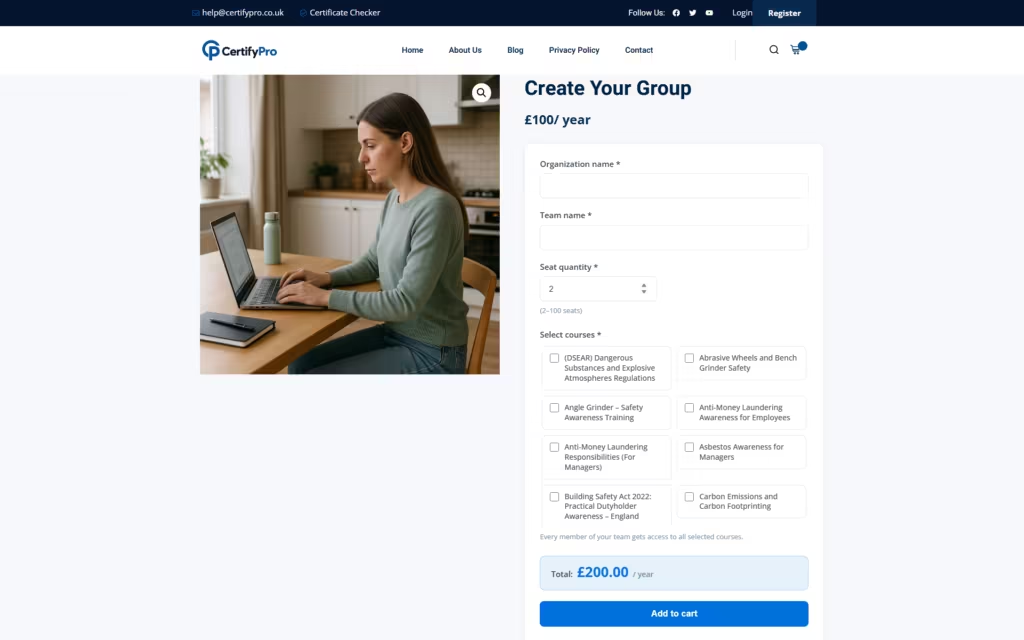
Ask for live examples, not screenshots, and look for one with the same kind of buyer as yours. Here is how that maps on this site. Team seats for companies: CertifyPro Training and Care Training Hub, both selling training to teams in the UK. A membership library: CoachTribe. Live class batches: French Immersion College. Certificates gated behind passing scores: EBP Central Academy.
2. Will you use an add-on, or write custom code?
A good answer starts with LearnDash itself and the add-ons that already do the job, such as LearnDash Groups, WooCommerce and Subscriptions, and only writes code where they stop. Be wary of both extremes: a developer who stacks a fourth add-on to avoid any code, and one who wants to build everything from scratch.
On CertifyPro, the group add-on asked buyers for a quantity on every course. Instead of replacing LearnDash Groups, a custom product type changed only the buying side: one seat count, three ways to buy and a yearly subscription that keeps seats in step. On French Immersion College, LearnDash stayed in place and a small plugin beside it handles staged access, seat limits, attendance and recordings.
3. Where will the custom code live?
The right answer is in its own plugin, never inside the theme. Code in the theme disappears the day you change the design, and it makes every theme update risky.
On Troy Downward’s course site, thousands of lines of custom PHP sat inside the parent theme. During the redesign that code moved into its own plugin, so the new custom theme could be built without touching students, courses or orders.
4. How will enrolment and payments be tested?
Listen for real test purchases: every way of buying, a renewal, a failed card and a refund, each followed by a check that the right course opened or closed for that student. Payment problems rarely show up in a demo. On Troy Downward’s site, Stripe webhooks were being refused because of a signing secret mismatch, the kind of fault you only find with a real payment.
5. What happens when LearnDash or an add-on updates?
A good answer includes a staging copy where updates run first, and a clear agreement on who updates the site after launch. LearnDash, WooCommerce and their add-ons all release updates through the year, and an untested update on a live course site is the most common reason people call a developer in a hurry.
6. How will my team run it day to day?
If managers or staff need to enrol people, follow progress or mark attendance, ask whether they will do it from a simple dashboard or from wp-admin. On Care Training Hub, managers track their staff on their own dashboards. On French Immersion College, staff run batches, attendance and recordings from a dashboard instead of the WordPress admin.
7. Will it stay fast with real students logged in?
Course pages are slower for logged-in students than for visitors, because they cannot be cached the same way. Ask how speed will be measured, and on which pages. On GCP Universe, quizzes that score in real time run on a lighter, faster build of the site’s existing theme.
8. Is the quote fixed, and who owns what?
Ask for a fixed price based on a written scope, with a list of what is included and how changes are priced. Then ask who owns the result. The answer should be you: the code, the content, admin access and the LearnDash licence in your own name, so you can change developers without starting over.
Red flags
- No live LearnDash examples, only templates or screenshots.
- A price before anyone has asked who pays and how access works.
- Plans to put business logic in the theme.
- No staging copy, so changes are made straight on the live site.
- Licences bought in the developer’s name, or no admin access for you.
- Testing that means clicking through as an administrator instead of a real student.
What it costs
It depends mostly on the first of your three answers. Selling one course to individuals is a setup job. Selling seats to companies, live batches or automatic continuing-education certificates usually means a small custom plugin, and that is where most of the budget goes. My LearnDash builds start at $499, always as a fixed quote from a written scope.
A short brief you can send
- Who pays, and how they get access.
- A link to your current site, if you have one.
- The three features you cannot launch without.
- Two sites you like, and what you like about them.
- Your launch date, and anything that must not change.
If you already run a LearnDash site and something is not working, the free LMS site check is a good first step: I look at the site and send a short PDF report within two working days. For a new build or a bigger change, the LearnDash Developer page shows more of the work, and Tutor LMS vs LearnDash helps if you are still choosing the plugin.
The service behind this article
Need this built?
LearnDash Developerfrom $499 Book a 30-min call All servicesRelated articles
Kajabi vs WordPress: what you pay, and what you own
Kajabi or your own WordPress site? What each costs to run in November 2026, what you can take with you when you leave, and when a move pays off.
Rebuilding my WordPress site: before and after, in numbers
The old home page loaded 19 stylesheets and 18 scripts. The rebuild loads 2 and 1. What changed, how it was measured, and five checks for your own site.
WordPress booking system: plugin or custom?
When a booking plugin is enough and when a custom build pays off, from 16 booking projects: what you sell, how the money arrives, who confirms.