WordPress booking system: plugin or custom?
Short answer: use a plugin when what you sell looks like an appointment, meaning a service, a person or one room among many, a time slot and a card payment. Build custom when the thing you sell, the way the money arrives or the step that confirms a booking does not fit that shape. Most of the job is working out which of the two you have.
This site has 16 projects tagged Booking system. Some take requests through a form, some needed a plugin of their own. Below are the patterns, with the projects behind them.
The short version, in a table
| Question | A form or a plugin usually fits | A custom build usually pays off |
|---|---|---|
| What is sold? | Time with a person, or one room among many | Something that can be sold only once per date, or places with a hard limit per group |
| How does the money arrive? | A card payment through a supported gateway, or nothing online | A local transfer, such as bKash, that someone checks by hand |
| Who confirms? | The calendar, or a person reading a request | A person, after a check, while the date stays held |
| What happens to unpaid requests? | Nothing to manage | Holds that must expire on time and reopen the date |
| How do customers hear back? | SMS first, email as well |
When a form or a plugin is enough
Plenty of booking pages need no booking engine at all. When the team reads every request before saying yes, a well-built request form does the job and costs less to keep running.
- New Start Hydration & Wellness Clinic takes appointment requests through Formidable Forms, with reCAPTCHA against spam and PHP handlers that store each request for the team.
- Owls Maths Tuition lets parents pick dates with jQuery UI date pickers and stores each booking in the site’s own database.
When the booking really is a standard appointment with online payment, a booking plugin is the sensible start. Amelia and Bookly are built around services, staff and time slots, and WooCommerce Bookings turns a product into something bookable by date or time. The budget is better spent on setup and design than on rebuilding what they already do.
The pattern: if a person reads every request anyway, the booking system is mostly a good form, a place to store requests and a fast reply.
When a custom build pays off
Custom wins when the plugin’s model is wrong for the business, not when one feature is missing. Bending a model that does not fit usually costs more over a few years than building the right one once.
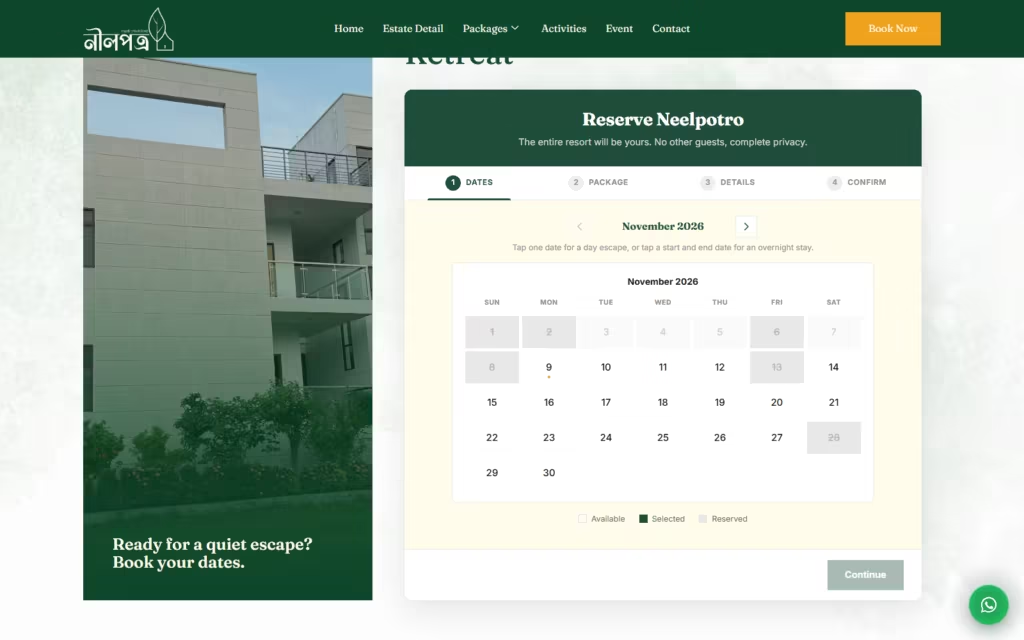
- Neel Potro Resort rents its whole property near Dhaka to one group, for a day or for several nights, and takes an advance by bKash Send Money. Room booking plugins assume many rooms and online card payments, so a custom plugin runs the bookings, with held dates while the team checks the payment and an SMS at every step.
- Climb Academy in Sofia needed slot choices tied to instructor capacity, with 4 to 6 children per group, and camp sign-ups where parents book weekly places, get sibling discounts and add meal plans in one checkout.
- Sakeena Academy uses a custom booking module where people pick a session and pay through Stripe in the same flow.
The pattern: the custom part sits exactly where the business is different, such as one property per date, a limit per instructor or a payment that a person checks.
Neel Potro, step by step
The resort shows what a booking plugin has to cover once a person is part of the flow.
- A four-step wizard: dates, package, guest details, review. One tap books a day escape, a start and an end date book an overnight stay, and reserved dates are greyed out.
- Each request holds its dates for a set time and shows the advance amount and the bKash number. The team approves it in wp-admin once the payment is verified.
- Holds expire on schedule through WP-Cron, with a fallback that keeps them expiring if the server cron is missing. The date reopens and the guest gets an SMS.
- The Novocom SMS gateway sends request, approval, cancellation, expiry and pre-arrival reminder messages, with a balance check and a log of every message.
- An admin calendar lets the team block dates by hand and add bookings taken over the phone.
The parts people forget to ask about
- Expiry. A request nobody pays for still blocks its date. Decide how long a hold lasts and how the customer hears that it lapsed.
- Scheduled jobs. WordPress runs its scheduled tasks when someone visits the site, so on a quiet site a hold can outlive its deadline. A real server cron, or a fallback like Neel Potro’s, closes that gap.
- Other channels. If staff also take bookings by phone or in person, they need a way to block dates by hand, or the website will sell a date that is already gone.
- Messages. Use the channel customers actually read. Neel Potro’s guests answer SMS faster than email, so both go out.
- Time zones. If customers book from other countries, show slots in their own time zone and test a day whose hours cross midnight. That is where date logic tends to break.
Five questions that settle it on a call
- What exactly is sold, and can two people book it at the same time?
- How does the money arrive, and who checks it?
- Does a person approve each booking, or is the calendar the final word?
- What happens to a request nobody pays for?
- Where else do bookings come from: phone, walk-ins, another calendar?
If every answer sounds like a standard appointment, start with a plugin and spend the budget on setup and design. If two or more answers are unusual, a custom plugin is usually cheaper over a few years than bending a plugin to fit.
The Booking System Development page has prices and more of these projects, and Custom WordPress Plugin Development covers the plugin side. The resort project is written up in full in the Neel Potro case study.
The service behind this article
Need this built?
Booking System Developmentfrom $499 Custom WordPress Plugin Developmentfrom $499 Book a 30-min call All servicesRelated articles
Hiring a LearnDash developer: what to ask before you pay
Hiring a LearnDash developer? The questions that separate a safe build from an expensive one, what a good answer sounds like, and the red flags to watch.

Kajabi vs WordPress: what you pay, and what you own
Kajabi or your own WordPress site? What each costs to run in November 2026, what you can take with you when you leave, and when a move pays off.
Rebuilding my WordPress site: before and after, in numbers
The old home page loaded 19 stylesheets and 18 scripts. The rebuild loads 2 and 1. What changed, how it was measured, and five checks for your own site.