Rebuilding my WordPress site: before and after, in numbers
Short version: the old home page of this site loaded 19 stylesheets and 18 script files, had no h1, no meta description and alt text on 7 of its 93 images. The rebuilt home page loads 2 stylesheets and 1 script, has one h1, a description, Open Graph tags and alt text on every image that carries meaning. On a throttled phone it loaded in 13 requests and 194 KB.
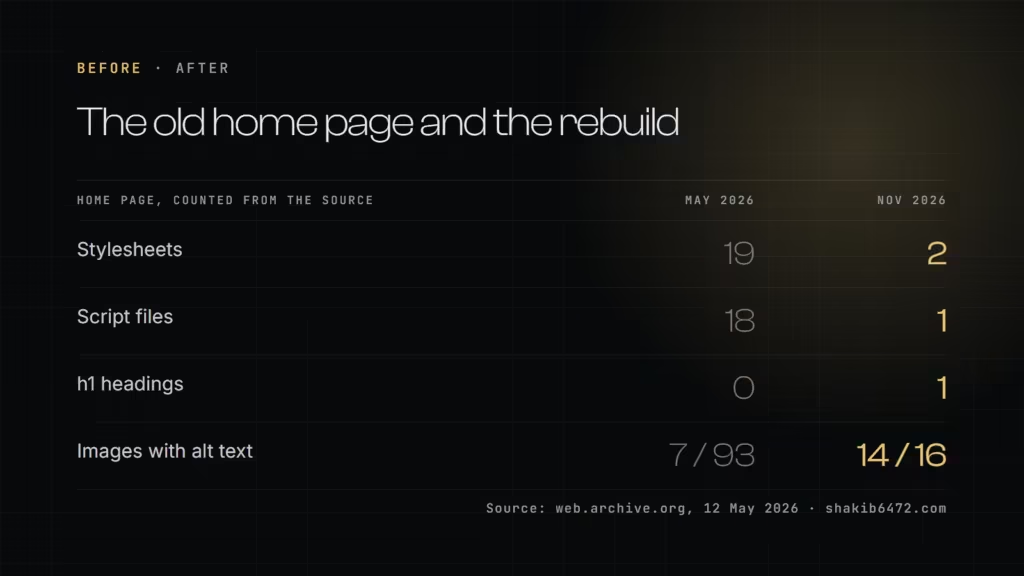
The before numbers come from a copy of the home page that the Internet Archive saved on 12 May 2026, so anyone can check them. The after numbers come from the live site in November 2026.
Old and new, side by side
| Old home page, May 2026 | Rebuilt home page, November 2026 | |
|---|---|---|
| Stylesheets | 19, one of them loaded twice | 2 |
| Script files | 18 | 1, the rest load only where needed |
| Fonts | Google Fonts, plus Roboto files from Elementor | Self-hosted, nothing from another host |
| h1 headings | 0 | 1 |
| Meta description | None | One, written for the page |
| Open Graph tags | 0 | 12 |
| Images with alt text | 7 of 93 | 14 of 16, the other 2 are decorative and marked as such |
| HTML size | 133 KB | 87 KB |
Where the old weight came from
The old site ran a portfolio theme bought off the shelf and built with Elementor. Of the 19 stylesheets, 12 came from the theme and its child theme, 5 from Elementor, one from a contact form plugin and one from Google Fonts. The scripts were jQuery and jQuery Migrate, Bootstrap, the Slick slider, the Magnific Popup lightbox, Contact Form 7, Elementor and Pro Elements, plus a few WordPress helpers they relied on.
None of that is unusual. A theme made for many buyers ships every feature to everyone, so every page paid for the slider, the lightbox and two overlapping Font Awesome stylesheets, whether it used them or not.
To be fair to Elementor: most of the stylesheets came from the theme, not the page builder. The scripts were split between the theme, Elementor and the jQuery stack they both relied on.
What the rebuild does instead
- A custom theme and a companion plugin, no page builder. Each page type gets only its own CSS: article styles load on articles, booking styles where the booking calendar is.
- The CSS for the first screen is inlined in the HTML, so the page can paint before the full stylesheet arrives.
- One small script loads the rest on demand. The table of contents on this article, for example, is driven by a script that only loads on articles that have one.
- Size limits are part of the build. If a script or a stylesheet grows past its budget, the build fails and nothing ships.
- Fonts are self-hosted, so the page asks no other host for anything before it shows.
- Images are served as AVIF in fixed sizes with width and height set, so nothing jumps while the page loads. Layout shift on the home page measured 0.006.
- Pages are cached on the server by LiteSpeed.
The Streetz Football took the same route for the same reason: speed was the point, so it was built as a custom theme with a companion plugin instead of a page builder.
The numbers on a slow phone
Measured on 10 November 2026 with Chrome, emulating a mid-range Android phone on a slow connection: a processor four times slower, 1.6 Mbps and 150 ms latency. Each figure is the median of two runs.
| Page | Requests | Transferred | Largest content shown |
|---|---|---|---|
| Home | 13 | 194 KB | 2.1 s |
| Services | 12 | 145 KB | 1.5 s |
| A service page | 13 | 226 KB | 1.4 s |
| A case study | 12 | 183 KB | 1.2 s |
The home page is the slowest of the four and the next one to work on. There is no matching figure for the old site: nobody timed it before it was replaced, so the file counts above are the honest comparison.
Five checks for your own site
- Open your home page, view the source and count the lines with
rel="stylesheet"and with<script src. Double figures for either is worth a closer look. - Search the source for
<h1. You want exactly one per page. - Search for
name="description"andog:image. Without them, Google and social networks write their own summary and pick their own picture. - Look for images with an empty or missing alt. Every image that carries meaning needs a short description.
- Check where fonts come from.
fonts.googleapis.comin the source means a request to another host before your text appears.
If your site fails three or more, a rebuild is not always the answer. Often it is enough to stop the theme loading what a page does not use and to fix the templates. The Elementor Developer page covers builder sites, and all services lists the rest.
The service behind this article
Need this built?
Elementor DeveloperFixed quote Book a 30-min call All servicesRelated articles
Hiring a LearnDash developer: what to ask before you pay
Hiring a LearnDash developer? The questions that separate a safe build from an expensive one, what a good answer sounds like, and the red flags to watch.

Kajabi vs WordPress: what you pay, and what you own
Kajabi or your own WordPress site? What each costs to run in November 2026, what you can take with you when you leave, and when a move pays off.

WordPress booking system: plugin or custom?
When a booking plugin is enough and when a custom build pays off, from 16 booking projects: what you sell, how the money arrives, who confirms.